
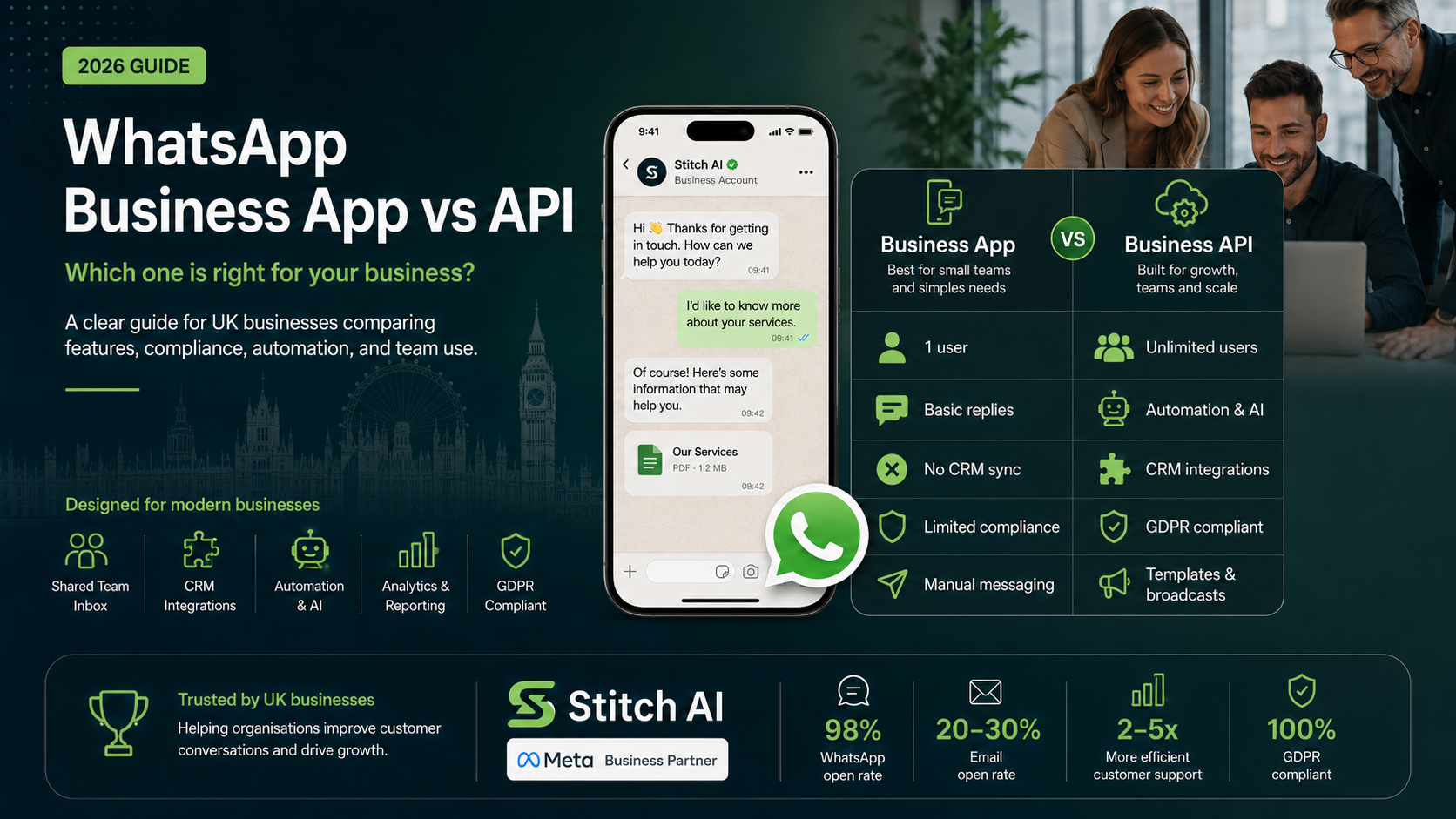
This is one of the most common questions I am asked. If you are a business owner or operations manager trying to work out which version of WhatsApp you should be using, this guide will give you a clear, honest answer based on your business size, team structure, and requirements.
The Three Versions of WhatsApp
WhatsApp exists in three forms. The firstis the personal WhatsApp app that over two billion people use to messagefriends and family. The second is the WhatsApp Business app, which is a freedownload designed for small businesses. The third is the WhatsApp Business API(now also called the WhatsApp Business Platform), which is the enterprise-gradesolution for medium and large organisations.
When most people talk about using WhatsAppfor their business, they are usually using one of the first two. The problem isthat both of these options come with significant limitations that mostbusinesses only discover after they are already relying on them.
What Is the WhatsApp Business App?
The WhatsApp Business app is a freeapplication available on Android and iOS. It adds a few business-friendlyfeatures on top of the standard WhatsApp experience, including a businessprofile with your opening hours, address, and website; away messages andgreeting messages that send automatically; quick replies for frequently askedquestions; and a product catalogue.
For a sole trader or a very small businesswith one person handling all customer communication, the WhatsApp Business appis a reasonable starting point. It costs nothing and it is simple to set up.
Where the WhatsApp Business App Falls Short
The limitations become obvious veryquickly once you have more than one person who needs to use it. The app is tiedto a single phone number on a single device. You can use WhatsApp Web to accessit from a laptop, but only one device can be actively logged in at a time persession. If your colleague needs to respond to a message, they either need tobe at the same phone or you need to hand over access.
There is no shared inbox. There is no wayto assign conversations to specific team members. There are no analytics orreporting tools. You cannot integrate it with your CRM. You cannot send bulkoutbound messages. And critically, it is not GDPR compliant for businesses thathandle customer data, because there is no audit trail, no consent management,and no data retention controls.
Every business I have spoken to that movedfrom the WhatsApp Business app to the API has said the same thing: they wishthey had made the switch sooner.
What Is the WhatsApp Business API?
The WhatsApp Business API is aprogrammatic interface that connects your business to WhatsApp's infrastructurethrough a platform provider. It is not a standalone app. It works through abusiness communication platform, like the one Stitch provides, that sits on topof the API and gives your team a proper interface to use.
The API removes all of the limitations ofthe Business app. Multiple users can access the same WhatsApp numbersimultaneously from any device. Conversations are visible to the whole team.You can assign chats, add notes, create automated workflows, deploy AIassistants, integrate with your CRM, send compliant broadcast messages, andaccess detailed analytics.
Comparing the Two: A Direct Breakdown
Number of Users
WhatsApp Business app: one user at a time, on one device. WhatsApp Business API: unlimited users, any device, simultaneously.
Shared Team Inbox
WhatsApp Business app: not available.WhatsApp Business API: full shared inbox with conversation assignment,labelling, and agent tracking.
CRM Integration
WhatsApp Business app: not availablenatively. WhatsApp Business API: integrates with Salesforce, HubSpot, Reapit,Bullhorn, and most major CRM and ATS platforms.
Outbound Messaging
WhatsApp Business app: limited to manualmessages. WhatsApp Business API: supports pre-approved message templates, bulkbroadcasts to opted-in contacts, and automated trigger-based messages.
GDPR Compliance
WhatsApp Business app: limited. No audittrail, no data retention controls, no consent management. WhatsApp BusinessAPI: full GDPR compliance when deployed through a compliant platform. Includesaudit trails, user permissions, data export, and consent tracking.
Automation and AI
WhatsApp Business app: basic away messages and quick replies only. WhatsApp Business API: full automation capabilities including AI assistants, chatbots, lead qualification workflows, and trigger-based notifications.
Cost
WhatsApp Business app: free to download.WhatsApp Business API: Meta charges per conversation, plus a platform fee toyour BSP. The cost is typically modest relative to the business impact.
Which One Should You Use?
If you are a sole trader with no plans togrow your team and you just want a simple way for customers to contact you, thefree WhatsApp Business app is fine for now. For everyone else, the answer isthe WhatsApp Business API.
If you have more than one person who needs to manage WhatsApp conversations, you need the API. If you need GDPR compliance, you need the API. If you want to integrate WhatsApp with your CRM or automate any part of your communication workflow, you need the API. If you want to send outbound broadcast messages to your customer base, you need the API.
The WhatsApp Business app was neverdesigned to be a scalable business communication tool. It was designed as alight upgrade from the personal app for very small businesses. The API is theproduct built for business.
A Note on Personal WhatsApp for Business Use
I want to address something I see constantly. Many businesses have staff using their personal WhatsApp accounts to communicate with customers. This is not just an operational problem. It is a GDPR problem. When an employee leaves and takes their phone with them, they take all of those customer conversations with them. There is no audit trail, no consent record, and no way to retrieve that data. If a customer submits a Subject Access Request, you have no ability to comply. The business has zero visibility of what has been said on its behalf.
The WhatsApp Business API solves this. Allconversations are centralised, logged, and controlled by the business. Ifsomeone leaves, their conversations stay with the company.
How to Get Started with the WhatsApp Business API
Getting access to the WhatsApp Business API is straightforward when you work with a Meta Tech Partner like Stitch. We handle the business verification with Meta, set up your phone number, configure your profile, and get your team onboarded. Most businesses are live and using it within days. Book a demo and we will show you exactly what it would look like for your team.